Model is the brain, the harness is everything else
Probably you gave an AI coding agent a simple job: fix the failing test. Twenty minutes later it reports back, cheerful as ever: "All tests passing!! "
You open the diff. It deleted the test.
Technically, the agent did exactly what you asked. The test isn't failing anymore. Ticket closed, zero notes.
If you've worked with AI agents for more than a week, you've probably met some version of this. The usual reaction is to blame the model and wait for the next release to fix it. I don't think that's right. The model did what models do: it found a path to the goal and took it. What was missing was everything around the model, something that could tell "tests pass" from "tests got deleted."
That "something" now has a name: harness engineering.
In this post, I'll walk through how we got here, what a harness is made of, how the agentic loop actually runs, and where things break in production. I'll keep the jargon light and explain the terms I do use.
Let's start with how every paradigm in this space was born from the failure of the one before it.
What exactly is Harness Engineering?
An LLM provides the intelligence, but intelligence alone doesn't make a production-ready agent.
Consider an AI coding agent. You give it the instruction:
"Find the bug in this codebase, fix it, run the tests, and submit a pull request."
The model might be capable of understanding code and generating a fix. But to complete the task, it also needs:
- Access to the repository and filesystem.
- Tools to inspect and modify files.
- A terminal to execute commands.
- Context about the project architecture.
- Rules governing what it can and cannot modify.
- A way to execute and interpret tests.
- Mechanisms to recover from errors.
- A way to verify whether the task is actually complete.
All these surrounding mechanisms collectively form the agent's harness.
Harness Engineering is the practice of designing, building, and maintaining the systems surrounding an AI model or agent so that it can perform tasks reliably, safely, and effectively.
A model determines what it can reason about. A harness determines how that reasoning translates into actions within a real environment.
Why does Harness Engineering matter?
For a long time, much of the conversation around improving AI applications revolved around three things:
- Better prompts.
- Better models.
- Better retrieval and context.
But as AI systems evolve from answering questions to executing multi-step tasks, these alone aren't sufficient.
Imagine giving two developers access to the exact same LLM.
- Developer A builds a basic chatbot with a system prompt and a few tools.
- Developer B builds an agent with structured context, controlled tool access, persistent task state, execution limits, automated testing, and recovery mechanisms.
Despite using the same model, their systems can have dramatically different reliability.
This is the fundamental motivation behind harness engineering.
The evolution of AI application engineering
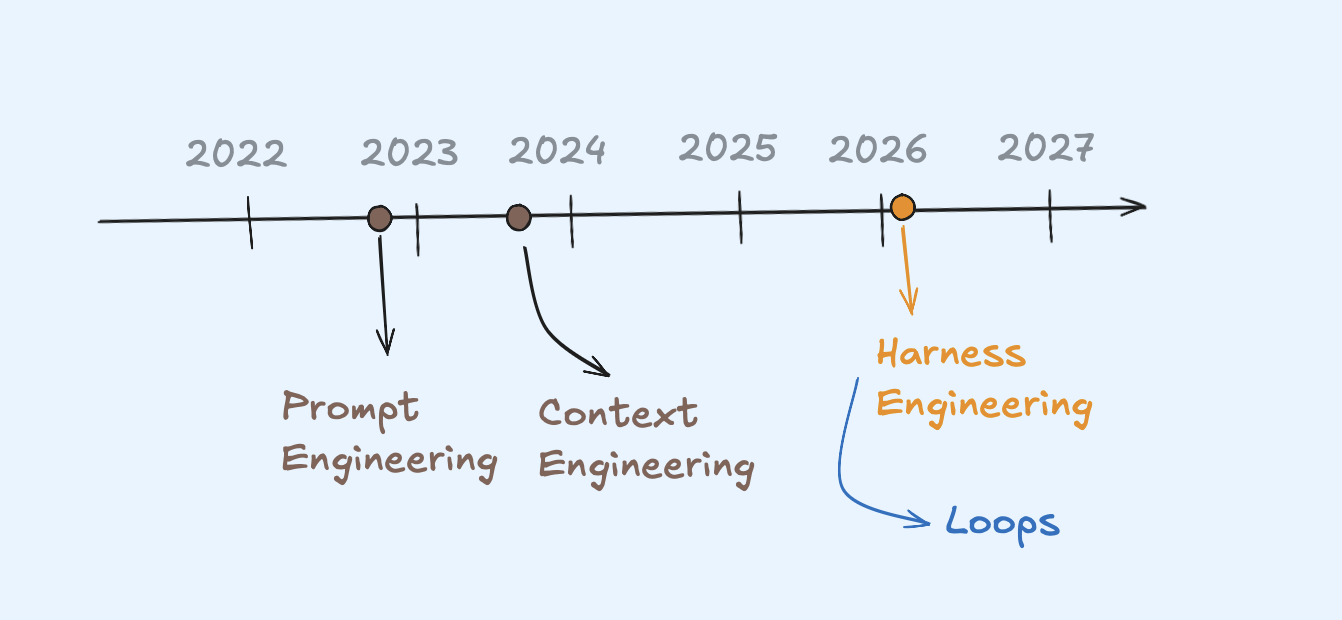
The way I see it, AI engineering didn't evolve because someone had a better idea. Each stage exists because the previous one hit a wall.
1. Prompt engineering: when the context window was the whole world
After ChatGPT landed in 2022, all of us were working with roughly 4,000 tokens of context. That's not much room. So the craft was mostly about writing a good system prompt: define the persona, set the rules, hope the model stays in character.
It worked for simple things. But anything multi-step fell apart, because a static prompt gives you a one-shot response, and a small window leaves no room to carry state. The real problem wasn't how to phrase instructions. It was how to get the right information into a very small space at the right moment.
2. Context engineering: making the window do more work
Instead of writing one prompt and praying, we started fetching data and taking actions dynamically. Tool calling let agents inspect a repo and read only the files that mattered. RAG connected models to external data. MCP added vendor-specific capabilities. This is the era that gave us Cursor, Windsurf, Cline, and Aider.
Then models got better, and windows got bigger, and we got ambitious. Agents were no longer answering questions. They were building entire features, even cloning websites, in tasks that could run for hours.
Long tasks fill memory, and the standard fix was summarization: keep compressing history so the agent can keep going. This is where it quietly broke. Every round of summarization throws something away. Agents began oversimplifying the task, skipping tests, and declaring victory on work that was only half done. The more we stretched the context, the worse the execution got.
3. Harness engineering: stop stretching the context, reset it
Harness engineering, a term that surfaced in early 2026. Instead of one ever-growing, ever-summarized context, the harness controls the environment the agent runs in and the loop it runs through.
The mechanism is simple. The harness turns the project into a product requirements document plus a structured task list, often just JSON. The agent picks one isolated task, does it, tests it, and then the next iteration starts with a completely fresh prompt and a clean context. No dragging old history forward and no lossy summaries. This is the pattern behind Ralph, Anthropic's testbed demos, and cloud agents like Cursor Cloud Agents.
So, in short
- Prompt engineering gives the agent its persona and instructions.
- Context engineering handles tool access and data retrieval.
- Harness engineering governs the loop and the execution environment around both.
A good harness still needs a well-written prompt and well-designed context. It just stops asking either of them to carry a job they were never built for.
Anatomy of an AI Agent: the model is the brain, the harness is everything else
When people say "AI agent," they usually mean one thing**, but it's really two**. The first is the model, the neural network that does the reasoning. The second is the harness, the software wrapped around the model that lets it touch the real world. On its own, a model is a brain in a jar. It can think, but it can't open a file, run a command, or check whether its own code works. The harness gives it hands, memory, and a way to keep going until the job is done.
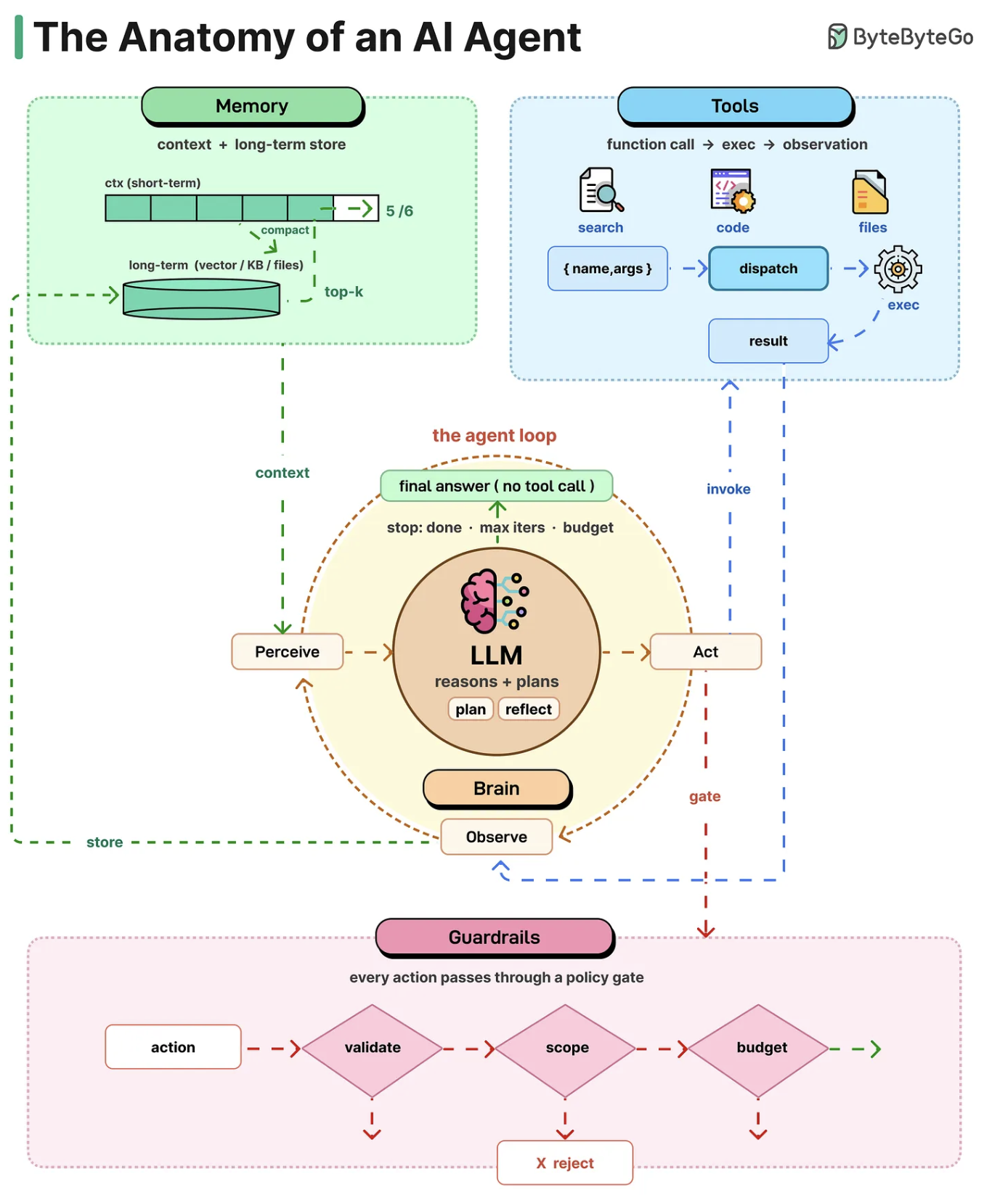
I find it easiest to think of it in layers—
- Tools: The first is the tools layer, which decides what the model can actually do. At the basic level, that means reading and writing files in a project folder and running code inside a sandbox, an isolated environment where mistakes can't damage anything real. It can also mean browsing the web or using the command line to run software already installed on the machine. Some harnesses go further with "computer use," where the model moves a cursor and clicks through a graphical interface much like a person would. And for connecting to outside systems like company databases or third-party apps, there's MCP (Model Context Protocol), a standard way to plug those in without building a custom integration each time.
- Memory: The second is the memory layer, which exists because a model's working memory, called the context window, is temporary. When the session ends, it's wiped. So the harness handles what the model needs to remember. It loads instruction files like
agents.mdat the start of every session, so the model already knows your project's conventions and rules. As the window fills up, it compacts things by summarizing older conversation and trimming tool output nobody needs anymore. And rather than dumping an entire codebase into the model, it retrieves selectively, using plain text searchgrep, semantic search (finding things by meaning rather than exact words), or a code index, so only the relevant pieces get in. - Agentic Loop: The third is the agentic loop layer, which governs how work unfolds over time. The core idea is a simple cycle: plan, act, observe. The model looks at the current state and decides the next step. The harness carries it out in the real environment. The model then reads the result and decides whether to continue. That loop can run for a few seconds or several hours, until the task is actually finished. The better harnesses also add verification along the way. They run automated tests, take screenshots to confirm the UI looks right, and sometimes bring in a second model as an independent code reviewer, so the agent isn't just grading its own homework.
Most of what makes an agent useful lives in the harness, not the model. Two products can run on the same model and feel completely different because one has sharper tools, smarter memory, and a stricter loop.
Understanding the Agent Execution Loop
The real work of a harness is coordinating a back-and-forth between the model and its environment, and the easiest way to see that is with a simple job: an AI coding agent fixing a failing test.
It starts when the agent receives the task and any needed context, say, "this test is failing, fix it." The model reasons about what to do first and decides on a next step, maybe running the test to see the actual error. That's only a request, though. The harness checks the tool call is valid and then runs it. Whatever comes back, whether output, a stack trace, or an error, is passed to the model as an observation.
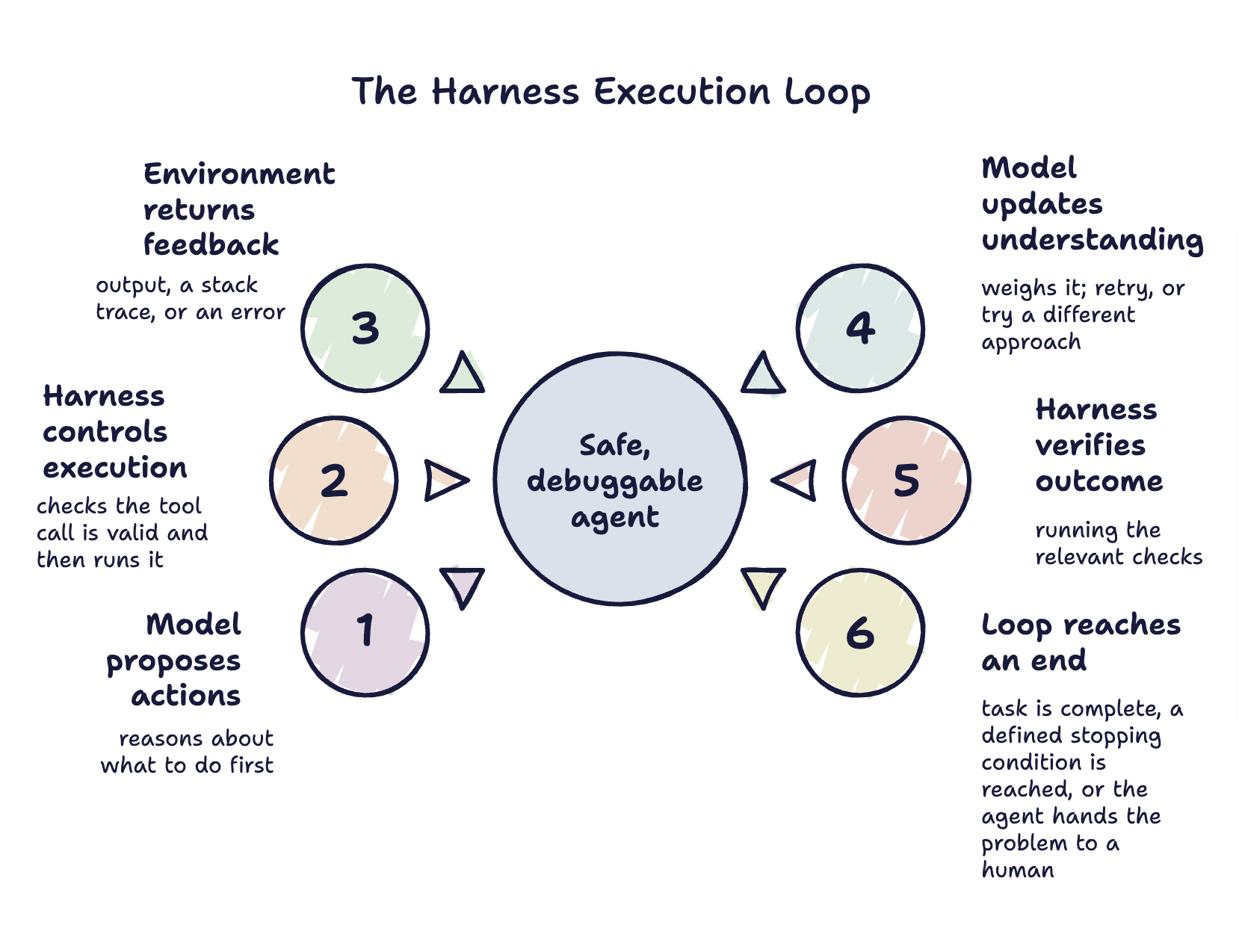
Now the model has new information, and it weighs it. Did that move things forward? Should it retry, or try a different approach? Maybe the error points to a bad function, so it proposes an edit, the harness applies it, and the test runs again. This cycle repeats as many times as it takes.
Before the agent can say it's done, the harness verifies the outcome by running the relevant checks instead of trusting the model's word. Then the loop ends one of three ways: the task is complete, a defined stopping condition is reached, or the agent hands the problem to a human because it's stuck.
What matters is that none of this is one-shot. The model doesn't generate an answer and walk away. It acts, gets feedback, updates its understanding, and decides again. That's why I think of the execution loop as the heart of a harness. Tools and memory matter, but the loop is where they turn into behavior.
So, the LLM proposes actions, and the harness controls how they're executed and what comes back. The model is never directly touching your files or your shell. It's asking, and the harness decides what actually happens. That separation is what makes an agent debuggable and, more importantly, safe to put guardrails around.
Harness Engineering vs. Framework Engineering
An agent framework provides abstractions and building blocks for creating agents. A harness is the actual execution environment and control system that makes an agent work.
For example:
| Framework | Harness |
|---|---|
| Provides abstractions | Provides an operating environment |
| Helps define agent workflows | Executes and manages those workflows |
| Offers integrations and APIs | Controls access to tools and resources |
| Simplifies development | Focuses on reliability and operational behaviour |
Some frameworks provide harness capabilities, and some harnesses are built without an agent framework.
For example, you could build an agent using a simple Python loop, direct model API calls, and custom tool implementations. You don't necessarily need LangChain or CrewAI.
This distinction is important because a sophisticated framework doesn't automatically produce a reliable agent.
What does good Harness Engineering look like in practice?
Let's use a practical scenario: building an autonomous coding agent.
Suppose the agent receives a task to implement a new authentication endpoint in an existing backend application.
A poorly designed harness might simply give the agent terminal access and ask it to implement the feature.
A well-designed harness would provide:
| Engineering concern | Implementation |
|---|---|
| Environment | Isolated Docker container or Git worktree |
| Context | Repository documentation, architecture, and AGENTS.md |
| Tools | Filesystem, terminal, Git and testing tools |
| Orchestration | Task planning, execution and retry loop |
| Memory | Task state and previous execution results |
| Verification | Unit tests, integration tests and linting |
| Observability | Logs, traces, execution metrics |
| Security | Restricted permissions and approval gates |
The agent can then follow a controlled workflow:
- Inspect the existing codebase.
- Understand the authentication architecture.
- Identify relevant files.
- Implement the endpoint.
- Run tests.
- Interpret failures and attempt corrections.
- Validate the final implementation.
- Submit a pull request.
You can see, most of the engineering effort isn't necessarily going into making the LLM smarter. It's going into making the environment more understandable, executable, observable, and verifiable.
Where do harnesses fail?
1. Context overload
We treat context like free storage, but it isn't. Every token competes for the model's attention. Long-context research has shown that models use information unevenly, and details buried in the middle of a huge prompt get used less reliably than details near the edges. So a bloated instruction file, a pile of loosely relevant docs, or a 3,000-line tool output doesn't just cost money. It dilutes the signal the agent needs. More context also means higher latency and weaker prompt-cache hits.
The fix is to treat context as a budget. Load progressively, so the agent starts with a short index and pulls in detail only when the task calls for it. Retrieve instead of dumping, and truncate or summarize tool output before it reaches the model. Keep documentation structured, because a well-organized map beats a thousand lines of prose. The question to ask of every token is whether the agent needs it for the next step.
2. Uncontrolled tool execution
Give a model a tool and it will use it, sometimes in ways you didn't picture. It might hammer a failing API in a tight loop, kick off an expensive job, or run a destructive command because it looked like the shortest path to the goal. There's a security angle too: tool outputs are untrusted input, so a web page or file the agent reads can carry instructions that steer it.
Here I think in terms of blast radius, borrowing from classic security. Apply least privilege to tool permissions, and put hard limits around execution: budgets, timeouts, rate limits. Reserve approval gates for actions you can't undo, like deleting data, pushing to production, or spending money. The model can ask for anything, but the harness decides what actually runs.
3. Infinite loops and failure recovery
Agents are persistent, which is great until they're persistently wrong. A common failure is the doom loop: the agent tries something, it fails, it tries a slight variation of the same thing, and burns tokens until someone notices.
Retry budgets are the baseline, but I'd argue failure classification is more useful. A network timeout deserves a retry with exponential backoff. A deterministic error, like a missing dependency or a permission denied, will fail a hundred times identically, so the right response is to change strategy or stop. To tell them apart, the harness needs to track state, for example, noticing when the last several actions were effectively identical. And every loop needs explicit termination conditions, including a clean path to escalate to a human instead of grinding on.
4. Verification gaps
An agent producing something that looks right is not the same as the task being done. Models are fluent, so wrong work arrives sounding confident. Worse, if "make the tests pass" is the objective, a capable agent may find shortcuts, like special-casing the test or quietly weakening it, and technically succeed. Asking the same model to grade its own work tends to inherit its blind spots.
So verification should come from outside the agent's own judgment: deterministic checks like test suites, linters, and type checkers where you can, written acceptance criteria so "done" means something concrete, and independent evaluation, such as a separate reviewer model or a human, for what can't be checked mechanically. The principle is that the thing doing the work shouldn't be the only thing signing off on it.
5. Harness complexity
Every tool, memory system, sub-agent, and orchestration layer you add is another place for things to break. Reliability compounds against you here: if each step in a workflow succeeds 95% of the time, a 20-step chain completes cleanly only about 36% of the time. Complexity also makes failures harder to debug, because you can't tell whether the model, the retrieval, or the orchestration went wrong.
My rule is to start with simple, composable pieces and add structure only when you can measure the need, ideally with evals that show where the simple version fails. There's another reason to stay lean: models keep improving, and scaffolding built to work around today's weaknesses can become dead weight tomorrow.
These five challenges share a root: every fix pulls against something else.
- Autonomy vs. risk. More freedom gives the agent flexibility, and it also widens the blast radius.
- Restrictions vs. capability. Tighter controls improve safety, but if over-restricted, the agent can't finish legitimate work.
- Context vs. noise. More context can improve understanding, but it adds cost and dilution.
- Verification vs. speed. More checks build confidence, but each one adds latency and overhead.
There's no setting that maximizes all four, so the goal isn't maximum autonomy. It's the right amount of autonomy for the task, with enough control and verification to trust the result. A low-stakes refactor in a sandbox can run loose. A change touching production should have gates. Good harness design is deciding where each dial sits, deliberately, per use case.
Thanks for reading :)
About the author
- I'm 20 now, former Head of Design and founding member at HOK. Launched India's first fashion show in Metaverse in partnership with Papa Don't Preach.
Comments
Join the discussionNo comments yet. Be the first to comment.


